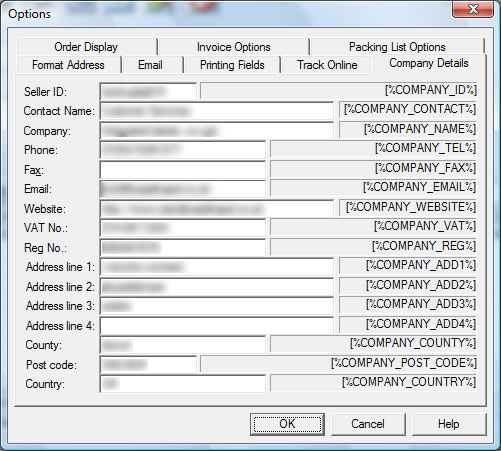
Your Company Details can be shown on Invoices and Packing Lists. You can also
include these details on your Emails and Online Tracking information. The entered
Company Details are replaced in the Invoice, Packing List, Emails and Online
Tracking by using macros.
The Company Details are associated with each site. Using this approach you can
use the same templates for more than 1 site each having different Company Details.
The macro shown after each field is the text to type into a template to use
this value. For example, the default footer text for the invoice is
[%COMPANY_NAME%] [%COMPANY_ADD1%] [%COMPANY_ADD2%] [%COMPANY_ADD3%] [%COMPANY_ADD4%]
[%COMPANY_POST_CODE%] Tel:[%COMPANY_TEL%] | Email:[%COMPANY_EMAIL%]|VAT No:[%COMPANY_VAT%]|Reg
No:[%COMPANY_REG%]
which shows all the relevant company details using the entered values in the
Company Details Options.
The Company Details macros are:
| Macro | Description | |
| [%COMPANY_ID%] | Company ID. This is normally your username ro shop name on the relevant websites | |
| [%COMPANY_CONTACT%] | Person or job title of person to contact for any order issues | |
| [%COMPANY_NAME%] | Trading name of your company | |
| [%COMPANY_TEL%] | Customer services telephone contact number | |
| [%COMPANY_FAX%] | Customer services fax number | |
| [%COMPANY_EMAIL%] | Customer sales email address | |
| [%COMPANY_WEBSITE%] | Your main company website | |
| [%COMPANY_VAT%] | Your VAT number (if you have one) | |
| [%COMPANY_REG%] | Your Company registration number | |
| [%COMPANY_ADD1%] | First line of your address | |
| [%COMPANY_ADD2%] | Second line of your address | |
| [%COMPANY_ADD3%] | Third line of your address | |
| [%COMPANY_ADD4%] | Fourth line of your address | |
| [%COMPANY_COUNTY%] | Your address county | |
| [%COMPANY_POST_CODE%] | Your address postcode | |
| [%COMPANY_COUNTRY%] | Your address country | |